Release notes
import LiteYouTube from '@site/src/components/LiteYouTube';
Version 1.58
UI Mode and Trace Viewer Improvements
- New 'system' theme option follows your OS dark/light mode preference
- Search functionality (Cmd/Ctrl+F) is now available in code editors
- Network details panel has been reorganized for better usability
- JSON responses are now automatically formatted for readability
Thanks to @cpAdm for contributing these improvements!
Miscellaneous
BrowserType.connectOverCDP() now accepts an is_local option. When set to True, it tells copilotbrowser that it runs on the same host as the CDP server, enabling file system optimizations.
Breaking Changes ⚠️
-
Removed
_reactand_vueselectors. See locators guide for alternatives. -
Removed
:lightselector engine suffix. Use standard CSS selectors instead. -
Option
devtoolsfrom BrowserType.launch() has been removed. Useargs=['--auto-open-devtools-for-tabs']instead. -
Removed macOS 13 support for WebKit. We recommend to upgrade your macOS version, or keep using an older copilotbrowser version.
Browser Versions
- Chromium 145.0.7632.6
- Mozilla Firefox 146.0.1
- WebKit 26.0
This version was also tested against the following stable channels:
- Google Chrome 144
- Microsoft Edge 144
Version 1.57
Chrome for Testing
Starting with this release, copilotbrowser switches from Chromium, to using Chrome for Testing builds. Both headed and headless browsers are subject to this. Your tests should still be passing after upgrading to copilotbrowser 1.57.
We're expecting no functional changes to come from this switch. The biggest change is the new icon and title in your toolbar.
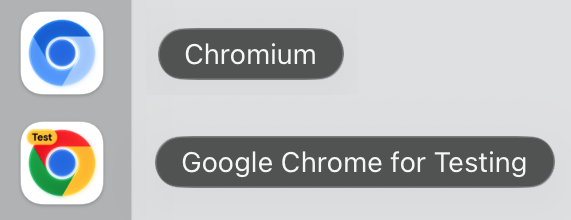
If you still see an unexpected behaviour change, please file an issue.
On Arm64 Linux, copilotbrowser continues to use Chromium.
Breaking Change
After 3 years of being deprecated, we removed page.accessibility from our API. Please use other libraries such as Axe if you need to test page accessibility. See our Node.js guide for integration with Axe.
New APIs
- Worker.event('console') event is emitted when JavaScript within the worker calls one of console API methods, e.g. console.log or console.dir. Worker.waitForEvent() can be used to wait for it.
- Locator.description() returns locator description previously set with Locator.describe().
- New option Locator.click.steps in Locator.click() and Locator.dragTo() that configures the number of
mousemoveevents emitted while moving the mouse pointer to the target element. - Network requests issued by Service Workers are now reported and can be routed through the BrowserContext, only in Chromium. You can opt out using the
copilotbrowser_DISABLE_SERVICE_WORKER_NETWORKenvironment variable. - Console messages from Service Workers are dispatched through Worker.event('console'). You can opt out of this using the
copilotbrowser_DISABLE_SERVICE_WORKER_CONSOLEenvironment variable.
Browser Versions
- Chromium 143.0.7499.4
- Mozilla Firefox 144.0.2
- WebKit 26.0
Version 1.56
New APIs
- New methods Page.consoleMessages() and Page.pageErrors() for retrieving the most recent console messages from the page
- New method Page.requests() for retrieving the most recent network requests from the page
Breaking Changes
- Event BrowserContext.event('backgroundPage') has been deprecated and will not be emitted. Method BrowserContext.backgroundPages() will return an empty list
Miscellaneous
- Aria snapshots render and compare
inputplaceholder
Browser Versions
- Chromium 141.0.7390.37
- Mozilla Firefox 142.0.1
- WebKit 26.0
Version 1.55
Codegen
- Automatic
to_be_visible()assertions: Codegen can now generate automaticto_be_visible()assertions for common UI interactions. This feature can be enabled in the Codegen settings UI.
Breaking Changes
- ⚠️ Dropped support for Chromium extension manifest v2.
Miscellaneous
- Added support for Debian 13 "Trixie".
Browser Versions
- Chromium 140.0.7339.16
- Mozilla Firefox 141.0
- WebKit 26.0
This version was also tested against the following stable channels:
- Google Chrome 139
- Microsoft Edge 139
Version 1.54
Highlights
-
New cookie property
partition_keyin BrowserContext.cookies() and BrowserContext.addCookies(). This property allows to save and restore partitioned cookies. See CHIPS MDN article for more information. Note that browsers have different support and defaults for cookie partitioning. -
New option
--user-data-dirin multiple commands. You can specify the same user data dir to reuse browsing state, like authentication, between sessions.copilotbrowser codegen --user-data-dir=./user-data -
copilotbrowser opendoes not open the test recorder anymore. Usecopilotbrowser codegeninstead.
Browser Versions
- Chromium 139.0.7258.5
- Mozilla Firefox 140.0.2
- WebKit 26.0
This version was also tested against the following stable channels:
- Google Chrome 140
- Microsoft Edge 140
Version 1.53
Trace Viewer and HTML Reporter Updates
- New Steps in Trace Viewer:
- New method Locator.describe() to describe a locator. Used for trace viewer.
button = page.get_by_test_id("btn-sub").describe("Subscribe button")
button.click()
python -m copilotbrowser install --listwill now list all installed browsers, versions and locations.
Browser Versions
- Chromium 138.0.7204.4
- Mozilla Firefox 139.0
- WebKit 18.5
This version was also tested against the following stable channels:
- Google Chrome 137
- Microsoft Edge 137
Version 1.52
Highlights
-
New method LocatorAssertions.toContainClass() to ergonomically assert individual class names on the element.
expect(page.get_by_role('listitem', name='Ship v1.52')).to_contain_class('done') -
Aria Snapshots got two new properties:
/childrenfor strict matching and/urlfor links.expect(locator).to_match_aria_snapshot("""
- list
- /children: equal
- listitem: Feature A
- listitem:
- link "Feature B":
- /url: "https://copilotbrowser.dev"
""")
Miscellaneous
- New option APIRequest.newContext.maxRedirects in APIRequest.newContext() to control the maximum number of redirects.
Breaking Changes
- Glob URL patterns in methods like Page.route() do not support
?and[]anymore. We recommend using regular expressions instead. - Method Route.continue() does not allow to override the
Cookieheader anymore. If aCookieheader is provided, it will be ignored, and the cookie will be loaded from the browser's cookie store. To set custom cookies, use BrowserContext.addCookies(). - macOS 13 is now deprecated and will no longer receive WebKit updates. Please upgrade to a more recent macOS version to continue benefiting from the latest WebKit improvements.
Browser Versions
- Chromium 136.0.7103.25
- Mozilla Firefox 137.0
- WebKit 18.4
This version was also tested against the following stable channels:
- Google Chrome 135
- Microsoft Edge 135
Version 1.51
Highlights
-
New option BrowserContext.storageState.indexedDB for BrowserContext.storageState() allows to save and restore IndexedDB contents. Useful when your application uses IndexedDB API to store authentication tokens, like Firebase Authentication.
Here is an example following the authentication guide:
# Save storage state into the file. Make sure to include IndexedDB.
storage = await context.storage_state(path="state.json", indexed_db=True)

# Create a new context with the saved storage state.
context = await browser.new_context(storage_state="state.json") -
New option Locator.filter.visible for Locator.filter() allows matching only visible elements.
# Ignore invisible todo items.
todo_items = page.get_by_test_id("todo-item").filter(visible=True)
# Check there are exactly 3 visible ones.
await expect(todo_items).to_have_count(3) -
New option
contrastfor methods Page.emulateMedia() and Browser.newContext() allows to emulate theprefers-contrastmedia feature. -
New option APIRequest.newContext.failOnStatusCode makes all fetch requests made through the
APIRequestContextthrow on response codes other than 2xx and 3xx.
Browser Versions
- Chromium 134.0.6998.35
- Mozilla Firefox 135.0
- WebKit 18.4
This version was also tested against the following stable channels:
- Google Chrome 133
- Microsoft Edge 133
Version 1.50
Async Pytest Plugin
- copilotbrowser's Pytest plugin now has support for Async Fixtures.
Miscellaneous
- Added method LocatorAssertions.toHaveAccessibleErrorMessage() to assert the Locator points to an element with a given aria errormessage.
UI updates
- New button in Codegen for picking elements to produce aria snapshots.
- Additional details (such as keys pressed) are now displayed alongside action API calls in traces.
- Display of
canvascontent in traces is error-prone. Display is now disabled by default, and can be enabled via theDisplay canvas contentUI setting. CallandNetworkpanels now display additional time information.
Breaking
- LocatorAssertions.toBeEditable() and Locator.isEditable() now throw if the target element is not
<input>,<select>, or a number of other editable elements.
Browser Versions
- Chromium 133.0.6943.16
- Mozilla Firefox 134.0
- WebKit 18.2
This version was also tested against the following stable channels:
- Google Chrome 132
- Microsoft Edge 132
Version 1.49
Aria snapshots
New assertion LocatorAssertions.toMatchAriaSnapshot() verifies page structure by comparing to an expected accessibility tree, represented as YAML.
page.goto("https://copilotbrowser.dev")
expect(page.locator('body')).to_match_aria_snapshot('''
  - banner:
    - heading /copilotbrowser enables reliable/ [level=1]
    - link "Get started"
    - link "Star microsoft/copilotbrowser on GitHub"
  - main:
    - img "Browsers (Chromium, Firefox, WebKit)"
    - heading "Any browser • Any platform • One API"
''')
You can generate this assertion with Test Generator or by calling Locator.ariaSnapshot().
Learn more in the aria snapshots guide.
Tracing groups
New method Tracing.group() allows you to visually group actions in the trace viewer.
# All actions between group and group_end
# will be shown in the trace viewer as a group.
page.context.tracing.group("Open copilotbrowser.dev > API")
page.goto("https://dayour.github.io/copilotbrowser/")
page.get_by_role("link", name="API").click()
page.context.tracing.group_end()
Breaking: chrome and msedge channels switch to new headless mode
This change affects you if you're using one of the following channels in your copilotbrowser.config.ts:
chrome,chrome-dev,chrome-beta, orchrome-canarymsedge,msedge-dev,msedge-beta, ormsedge-canary
After updating to copilotbrowser v1.49, run your test suite. If it still passes, you're good to go. If not, you will probably need to update your snapshots, and adapt some of your test code around PDF viewers and extensions. See issue #33566 for more details.
Try new Chromium headless
You can opt into the new headless mode by using 'chromium' channel. As official Chrome documentation puts it:
New Headless on the other hand is the real Chrome browser, and is thus more authentic, reliable, and offers more features. This makes it more suitable for high-accuracy end-to-end web app testing or browser extension testing.
See issue #33566 for the list of possible breakages you could encounter and more details on Chromium headless. Please file an issue if you see any problems after opting in.
pytest test_login.py --browser-channel chromium
Miscellaneous
- There will be no more updates for WebKit on Ubuntu 20.04 and Debian 11. We recommend updating your OS to a later version.
<canvas>elements inside a snapshot now draw a preview.- Python 3.8 is not supported anymore.
Browser Versions
- Chromium 131.0.6778.33
- Mozilla Firefox 132.0
- WebKit 18.2
This version was also tested against the following stable channels:
- Google Chrome 130
- Microsoft Edge 130
Version 1.48
WebSocket routing
New methods Page.routeWebSocket() and BrowserContext.routeWebSocket() allow to intercept, modify and mock WebSocket connections initiated in the page. Below is a simple example that mocks WebSocket communication by responding to a "request" with a "response".
def message_handler(ws: WebSocketRoute, message: Union[str, bytes]):
  if message == "request":
    ws.send("response")

page.route_web_socket("/ws", lambda ws: ws.on_message(
    lambda message: message_handler(ws, message)
))
See WebSocketRoute for more details.
UI updates
- New "copy" buttons for annotations and test location in the HTML report.
- Route method calls like Route.fulfill() are not shown in the report and trace viewer anymore. You can see which network requests were routed in the network tab instead.
- New "Copy as cURL" and "Copy as fetch" buttons for requests in the network tab.
Miscellaneous
- New method Page.requestGC() may help detect memory leaks.
- Requests made by
APIRequestContextnow record detailed timing and security information in the HAR.
Browser Versions
- Chromium 130.0.6723.19
- Mozilla Firefox 130.0
- WebKit 18.0
This version was also tested against the following stable channels:
- Google Chrome 129
- Microsoft Edge 129
Version 1.47
Network Tab improvements
The Network tab in the trace viewer has several nice improvements:
- filtering by asset type and URL
- better display of query string parameters
- preview of font assets
Miscellaneous
- The
mcr.microsoft.com/copilotbrowser/python:v1.47.0now serves a copilotbrowser image based on Ubuntu 24.04 Noble. To use the 22.04 jammy-based image, please usemcr.microsoft.com/copilotbrowser/python:v1.47.0-jammyinstead. - The
:latest/:focal/:jammytag for copilotbrowser Docker images is no longer being published. Pin to a specific version for better stability and reproducibility. - TLS client certificates can now be passed from memory by passing Browser.newContext.clientCertificates.cert and Browser.newContext.clientCertificates.key as bytes instead of file paths.
- Locator.selectOption.noWaitAfter in Locator.selectOption() was deprecated.
- We've seen reports of WebGL in Webkit misbehaving on GitHub Actions
macos-13. We recommend upgrading GitHub Actions tomacos-14.
Browser Versions
- Chromium 129.0.6668.29
- Mozilla Firefox 130.0
- WebKit 18.0
This version was also tested against the following stable channels:
- Google Chrome 128
- Microsoft Edge 128
Version 1.46
TLS Client Certificates
copilotbrowser now allows to supply client-side certificates, so that server can verify them, as specified by TLS Client Authentication.
You can provide client certificates as a parameter of Browser.newContext() and APIRequest.newContext(). The following snippet sets up a client certificate for https://example.com:
context = browser.new_context(
    client_certificates=[
        {
            "origin": "https://example.com",
            "certPath": "client-certificates/cert.pem",
            "keyPath": "client-certificates/key.pem",
        }
    ],
)
Trace Viewer Updates
- Content of text attachments is now rendered inline in the attachments pane.
- New setting to show/hide routing actions like Route.continue().
- Request method and status are shown in the network details tab.
- New button to copy source file location to clipboard.
- Metadata pane now displays the
base_url.
Miscellaneous
- New
maxRetriesoption in APIRequestContext.fetch() which retries on theECONNRESETnetwork error.
Browser Versions
- Chromium 128.0.6613.18
- Mozilla Firefox 128.0
- WebKit 18.0
This version was also tested against the following stable channels:
- Google Chrome 127
- Microsoft Edge 127
Version 1.45
Clock
Utilizing the new Clock API allows to manipulate and control time within tests to verify time-related behavior. This API covers many common scenarios, including:
- testing with predefined time;
- keeping consistent time and timers;
- monitoring inactivity;
- ticking through time manually.
# Initialize clock with some time before the test time and let the page load
# naturally. `Date.now` will progress as the timers fire.
page.clock.install(time=datetime.datetime(2024, 2, 2, 8, 0, 0))
page.goto("http://localhost:3333")

# Pretend that the user closed the laptop lid and opened it again at 10am.
# Pause the time once reached that point.
page.clock.pause_at(datetime.datetime(2024, 2, 2, 10, 0, 0))

# Assert the page state.
expect(page.get_by_test_id("current-time")).to_have_text("2/2/2024, 10:00:00 AM")

# Close the laptop lid again and open it at 10:30am.
page.clock.fast_forward("30:00")
expect(page.get_by_test_id("current-time")).to_have_text("2/2/2024, 10:30:00 AM")
See the clock guide for more details.
Miscellaneous
-
Method Locator.setInputFiles() now supports uploading a directory for
<input type=file webkitdirectory>elements.page.get_by_label("Upload directory").set_input_files('mydir') -
Multiple methods like Locator.click() or Locator.press() now support a
ControlOrMetamodifier key. This key maps toMetaon macOS and maps toControlon Windows and Linux.# Press the common keyboard shortcut Control+S or Meta+S to trigger a "Save" operation.
page.keyboard.press("ControlOrMeta+S") -
New property
httpCredentials.sendin APIRequest.newContext() that allows to either always send theAuthorizationheader or only send it in response to401 Unauthorized. -
copilotbrowser now supports Chromium, Firefox and WebKit on Ubuntu 24.04.
-
v1.45 is the last release to receive WebKit update for macOS 12 Monterey. Please update macOS to keep using the latest WebKit.
Browser Versions
- Chromium 127.0.6533.5
- Mozilla Firefox 127.0
- WebKit 17.4
This version was also tested against the following stable channels:
- Google Chrome 126
- Microsoft Edge 126
Version 1.44
New APIs
Accessibility assertions
-
LocatorAssertions.toHaveAccessibleName() checks if the element has the specified accessible name:
locator = page.get_by_role("button")
expect(locator).to_have_accessible_name("Submit") -
LocatorAssertions.toHaveAccessibleDescription() checks if the element has the specified accessible description:
locator = page.get_by_role("button")
expect(locator).to_have_accessible_description("Upload a photo") -
LocatorAssertions.toHaveRole() checks if the element has the specified ARIA role:
locator = page.get_by_test_id("save-button")
expect(locator).to_have_role("button")
Locator handler
- After executing the handler added with Page.addLocatorHandler(), copilotbrowser will now wait until the overlay that triggered the handler is not visible anymore. You can opt-out of this behavior with the new
no_wait_afteroption. - You can use new
timesoption in Page.addLocatorHandler() to specify maximum number of times the handler should be run. - The handler in Page.addLocatorHandler() now accepts the locator as argument.
- New Page.removeLocatorHandler() method for removing previously added locator handlers.
locator = page.get_by_text("This interstitial covers the button")
page.add_locator_handler(locator, lambda overlay: overlay.locator("#close").click(), times=3, no_wait_after=True)
# Run your tests that can be interrupted by the overlay.
# ...
page.remove_locator_handler(locator)
Miscellaneous options
- PageAssertions.toHaveURL() now supports
ignore_caseoption.
Browser Versions
- Chromium 125.0.6422.14
- Mozilla Firefox 125.0.1
- WebKit 17.4
This version was also tested against the following stable channels:
- Google Chrome 124
- Microsoft Edge 124
Version 1.43
New APIs
-
Method BrowserContext.clearCookies() now supports filters to remove only some cookies.
# Clear all cookies.
context.clear_cookies()
# New: clear cookies with a particular name.
context.clear_cookies(name="session-id")
# New: clear cookies for a particular domain.
context.clear_cookies(domain="my-origin.com") -
New method Locator.contentFrame() converts a
Locatorobject to aFrameLocator. This can be useful when you have aLocatorobject obtained somewhere, and later on would like to interact with the content inside the frame.locator = page.locator("iframe[name='embedded']")
# ...
frame_locator = locator.content_frame
frame_locator.getByRole("button").click() -
New method FrameLocator.owner() converts a
FrameLocatorobject to aLocator. This can be useful when you have aFrameLocatorobject obtained somewhere, and later on would like to interact with theiframeelement.frame_locator = page.frame_locator("iframe[name='embedded']")
# ...
locator = frame_locator.owner
expect(locator).to_be_visible() -
Conda builds are now published for macOS-arm64 and Linux-arm64.
Browser Versions
- Chromium 124.0.6367.8
- Mozilla Firefox 124.0
- WebKit 17.4
This version was also tested against the following stable channels:
- Google Chrome 123
- Microsoft Edge 123
Version 1.42
New Locator Handler
New method Page.addLocatorHandler() registers a callback that will be invoked when specified element becomes visible and may block copilotbrowser actions. The callback can get rid of the overlay. Here is an example that closes a cookie dialog when it appears.
# Setup the handler.
page.add_locator_handler(
    page.get_by_role("heading", name="Hej! You are in control of your cookies."),
    lambda: page.get_by_role("button", name="Accept all").click(),
)
# Write the test as usual.
page.goto("https://www.ikea.com/")
page.get_by_role("link", name="Collection of blue and white").click()
expect(page.get_by_role("heading", name="Light and easy")).to_be_visible()
New APIs
- Page.pdf() accepts two new options Page.pdf.tagged and Page.pdf.outline.
Announcements
- ⚠️ Ubuntu 18 is not supported anymore.
Browser Versions
- Chromium 123.0.6312.4
- Mozilla Firefox 123.0
- WebKit 17.4
This version was also tested against the following stable channels:
- Google Chrome 122
- Microsoft Edge 123
Version 1.41
New APIs
- New method Page.unrouteAll() removes all routes registered by Page.route() and Page.routeFromHAR(). Optionally allows to wait for ongoing routes to finish, or ignore any errors from them.
- New method BrowserContext.unrouteAll() removes all routes registered by BrowserContext.route() and BrowserContext.routeFromHAR(). Optionally allows to wait for ongoing routes to finish, or ignore any errors from them.
- New options Page.screenshot.style in Page.screenshot() and Locator.screenshot.style in Locator.screenshot() to add custom CSS to the page before taking a screenshot.
Browser Versions
- Chromium 121.0.6167.57
- Mozilla Firefox 121.0
- WebKit 17.4
This version was also tested against the following stable channels:
- Google Chrome 120
- Microsoft Edge 120
Version 1.40
Test Generator Update
New tools to generate assertions:
- "Assert visibility" tool generates LocatorAssertions.toBeVisible().
- "Assert value" tool generates LocatorAssertions.toHaveValue().
- "Assert text" tool generates LocatorAssertions.toContainText().
Here is an example of a generated test with assertions:
from copilotbrowser.sync_api import Page, expect

def test_example(page: Page) -> None:
    page.goto("https://dayour.github.io/copilotbrowser/")
    page.get_by_role("link", name="Get started").click()
    expect(page.get_by_label("Breadcrumbs").get_by_role("list")).to_contain_text("Installation")
    expect(page.get_by_label("Search")).to_be_visible()
    page.get_by_label("Search").click()
    page.get_by_placeholder("Search docs").fill("locator")
    expect(page.get_by_placeholder("Search docs")).to_have_value("locator");
New APIs
- Options Page.close.reason in Page.close(), BrowserContext.close.reason in BrowserContext.close() and Browser.close.reason in Browser.close(). Close reason is reported for all operations interrupted by the closure.
- Option BrowserType.launchPersistentContext.firefoxUserPrefs in BrowserType.launchPersistentContext().
Other Changes
- Method Download.path() throws an error for failed and cancelled downloads.
Browser Versions
- Chromium 120.0.6099.28
- Mozilla Firefox 119.0
- WebKit 17.4
This version was also tested against the following stable channels:
- Google Chrome 119
- Microsoft Edge 119
Version 1.39
Evergreen browsers update.
Browser Versions
- Chromium 119.0.6045.9
- Mozilla Firefox 118.0.1
- WebKit 17.4
This version was also tested against the following stable channels:
- Google Chrome 118
- Microsoft Edge 118
Version 1.38
Trace Viewer Updates
- Zoom into time range.
- Network panel redesign.
New APIs
- BrowserContext.event('webError')
- Locator.pressSequentially()
Deprecations
- The following methods were deprecated: Page.type(), Frame.type(), Locator.type() and ElementHandle.type(). Please use Locator.fill() instead which is much faster. Use Locator.pressSequentially() only if there is a special keyboard handling on the page, and you need to press keys one-by-one.
Browser Versions
- Chromium 117.0.5938.62
- Mozilla Firefox 117.0
- WebKit 17.0
This version was also tested against the following stable channels:
- Google Chrome 116
- Microsoft Edge 116
Version 1.37
Highlights
-
New --full-page-screenshot command line flag allows taking a full page screenshot on failure.
-
It is now possible to override the context options for a single test by using the browser_context_args marker.
-
pytest-copilotbrowseris now also getting published on Anaconda
📚 Debian 12 Bookworm Support
copilotbrowser now supports Debian 12 Bookworm on both x86_64 and arm64 for Chromium, Firefox and WebKit. Let us know if you encounter any issues!
Linux support looks like this:
| Ubuntu 20.04 | Ubuntu 22.04 | Debian 11 | Debian 12 | |
|---|---|---|---|---|
| Chromium | ✅ | ✅ | ✅ | ✅ |
| WebKit | ✅ | ✅ | ✅ | ✅ |
| Firefox | ✅ | ✅ | ✅ | ✅ |
Browser Versions
- Chromium 116.0.5845.82
- Mozilla Firefox 115.0
- WebKit 17.0
This version was also tested against the following stable channels:
- Google Chrome 115
- Microsoft Edge 115
Version 1.36
🏝️ Summer maintenance release.
Browser Versions
- Chromium 115.0.5790.75
- Mozilla Firefox 115.0
- WebKit 17.0
This version was also tested against the following stable channels:
- Google Chrome 114
- Microsoft Edge 114
Version 1.35
Highlights
-
New option
mask_colorfor methods Page.screenshot() and Locator.screenshot() to change default masking color. -
New
uninstallCLI command to uninstall browser binaries:$ copilotbrowser uninstall # remove browsers installed by this installation
$ copilotbrowser uninstall --all # remove all ever-install copilotbrowser browsers
Browser Versions
- Chromium 115.0.5790.13
- Mozilla Firefox 113.0
- WebKit 16.4
This version was also tested against the following stable channels:
- Google Chrome 114
- Microsoft Edge 114
Version 1.34
Highlights
-
New Locator.and() to create a locator that matches both locators.
button = page.get_by_role("button").and_(page.get_by_title("Subscribe")) -
New events BrowserContext.event('console') and BrowserContext.event('dialog') to subscribe to any dialogs and console messages from any page from the given browser context. Use the new methods ConsoleMessage.page() and Dialog.page() to pin-point event source.
Browser Versions
- Chromium 114.0.5735.26
- Mozilla Firefox 113.0
- WebKit 16.4
This version was also tested against the following stable channels:
- Google Chrome 113
- Microsoft Edge 113
Version 1.33
Locators Update
-
Use Locator.or() to create a locator that matches either of the two locators. Consider a scenario where you'd like to click on a "New email" button, but sometimes a security settings dialog shows up instead. In this case, you can wait for either a "New email" button, or a dialog and act accordingly:
new_email = page.get_by_role("button", name="New email")
dialog = page.get_by_text("Confirm security settings")
expect(new_email.or_(dialog)).is_visible()
if (dialog.is_visible()):
  page.get_by_role("button", name="Dismiss").click()
new_email.click() -
Use new options Locator.filter.hasNot and Locator.filter.hasNotText in Locator.filter() to find elements that do not match certain conditions.
row_locator = page.locator("tr")
row_locator.filter(has_not_text="text in column 1").filter(
    has_not=page.get_by_role("button", name="column 2 button")
).screenshot() -
Use new web-first assertion LocatorAssertions.toBeAttached() to ensure that the element is present in the page's DOM. Do not confuse with the LocatorAssertions.toBeVisible() that ensures that element is both attached & visible.
New APIs
- Locator.or()
- New option Locator.filter.hasNot in Locator.filter()
- New option Locator.filter.hasNotText in Locator.filter()
- LocatorAssertions.toBeAttached()
- New option Route.fetch.timeout in Route.fetch()
⚠️ Breaking change
- The
mcr.microsoft.com/copilotbrowser/python:v1.33.0now serves a copilotbrowser image based on Ubuntu Jammy. To use the focal-based image, please usemcr.microsoft.com/copilotbrowser/python:v1.33.0-focalinstead.
Browser Versions
- Chromium 113.0.5672.53
- Mozilla Firefox 112.0
- WebKit 16.4
This version was also tested against the following stable channels:
- Google Chrome 112
- Microsoft Edge 112
Version 1.32
New APIs
- Custom expect message, see test assertions documentation.
- New options Page.routeFromHAR.updateMode and Page.routeFromHAR.updateContent in Page.routeFromHAR() and BrowserContext.routeFromHAR().
- Chaining existing locator objects, see locator docs for details.
- New option Tracing.startChunk.name in method Tracing.startChunk().
Browser Versions
- Chromium 112.0.5615.29
- Mozilla Firefox 111.0
- WebKit 16.4
This version was also tested against the following stable channels:
- Google Chrome 111
- Microsoft Edge 111
Version 1.31
New APIs
-
New assertion LocatorAssertions.toBeInViewport() ensures that locator points to an element that intersects viewport, according to the intersection observer API.
from copilotbrowser.sync_api import expect

locator = page.get_by_role("button")

# Make sure at least some part of element intersects viewport.
expect(locator).to_be_in_viewport()

# Make sure element is fully outside of viewport.
expect(locator).not_to_be_in_viewport()

# Make sure that at least half of the element intersects viewport.
expect(locator).to_be_in_viewport(ratio=0.5)
Miscellaneous
- DOM snapshots in trace viewer can be now opened in a separate window.
- New option Route.fetch.maxRedirects for method Route.fetch().
- copilotbrowser now supports Debian 11 arm64.
- Official docker images now include Node 18 instead of Node 16.
Browser Versions
- Chromium 111.0.5563.19
- Mozilla Firefox 109.0
- WebKit 16.4
This version was also tested against the following stable channels:
- Google Chrome 110
- Microsoft Edge 110
Version 1.30
Browser Versions
- Chromium 110.0.5481.38
- Mozilla Firefox 108.0.2
- WebKit 16.4
This version was also tested against the following stable channels:
- Google Chrome 109
- Microsoft Edge 109
Version 1.29
New APIs
-
New method Route.fetch() and new option
jsonfor Route.fulfill():def handle_route(route: Route):
# Fetch original settings.
response = route.fetch()
# Force settings theme to a predefined value.
json = response.json()
json["theme"] = "Solorized"
# Fulfill with modified data.
route.fulfill(json=json)
page.route("**/api/settings", handle_route) -
New method Locator.all() to iterate over all matching elements:
# Check all checkboxes!
checkboxes = page.get_by_role("checkbox")
for checkbox in checkboxes.all():
checkbox.check() -
Locator.selectOption() matches now by value or label:
<select multiple>
  <option value="red">Red</option>
  <option value="green">Green</option>
  <option value="blue">Blue</option>
</select>element.select_option("Red")
Miscellaneous
- Option
postDatain method Route.continue() now supportsSerializablevalues.
Browser Versions
- Chromium 109.0.5414.46
- Mozilla Firefox 107.0
- WebKit 16.4
This version was also tested against the following stable channels:
- Google Chrome 108
- Microsoft Edge 108
Version 1.28
copilotbrowser Tools
- Live Locators in CodeGen. Generate a locator for any element on the page using "Explore" tool.

New APIs
- Locator.blur()
- Locator.clear()
Browser Versions
- Chromium 108.0.5359.29
- Mozilla Firefox 106.0
- WebKit 16.4
This version was also tested against the following stable channels:
- Google Chrome 107
- Microsoft Edge 107
Version 1.27
Locators
With these new APIs writing locators is a joy:
- Page.getByText() to locate by text content.
- Page.getByRole() to locate by ARIA role, ARIA attributes and accessible name.
- Page.getByLabel() to locate a form control by associated label's text.
- Page.getByTestId() to locate an element based on its
data-testidattribute (other attribute can be configured). - Page.getByPlaceholder() to locate an input by placeholder.
- Page.getByAltText() to locate an element, usually image, by its text alternative.
- Page.getByTitle() to locate an element by its title.
page.get_by_label("User Name").fill("John")

page.get_by_label("Password").fill("secret-password")

page.get_by_role("button", name="Sign in").click()

expect(page.get_by_text("Welcome, John!")).to_be_visible()
All the same methods are also available on Locator, FrameLocator and Frame classes.
Other highlights
- As announced in v1.25, Ubuntu 18 will not be supported as of Dec 2022. In addition to that, there will be no WebKit updates on Ubuntu 18 starting from the next copilotbrowser release.
Behavior Changes
-
LocatorAssertions.toHaveAttribute() with an empty value does not match missing attribute anymore. For example, the following snippet will succeed when
buttondoes not have adisabledattribute.expect(page.get_by_role("button")).to_have_attribute("disabled", "")
Browser Versions
- Chromium 107.0.5304.18
- Mozilla Firefox 105.0.1
- WebKit 16.0
This version was also tested against the following stable channels:
- Google Chrome 106
- Microsoft Edge 106
Version 1.26
Assertions
- New option
enabledfor LocatorAssertions.toBeEnabled(). - LocatorAssertions.toHaveText() now pierces open shadow roots.
- New option
editablefor LocatorAssertions.toBeEditable(). - New option
visiblefor LocatorAssertions.toBeVisible().
Other highlights
- New option
max_redirectsfor APIRequestContext.get() and others to limit redirect count. - Python 3.11 is now supported.
Behavior Change
A bunch of copilotbrowser APIs already support the wait_until: "domcontentloaded" option.
For example:
page.goto("https://copilotbrowser.dev", wait_until="domcontentloaded")
Prior to 1.26, this would wait for all iframes to fire the DOMContentLoaded
event.
To align with web specification, the 'domcontentloaded' value only waits for
the target frame to fire the 'DOMContentLoaded' event. Use wait_until="load" to wait for all iframes.
Browser Versions
- Chromium 106.0.5249.30
- Mozilla Firefox 104.0
- WebKit 16.0
This version was also tested against the following stable channels:
- Google Chrome 105
- Microsoft Edge 105
Version 1.25
Announcements
- 🎁 We now ship Ubuntu 22.04 Jammy Jellyfish docker image:
mcr.microsoft.com/copilotbrowser/python:v1.34.0-jammy. - 🪦 This is the last release with macOS 10.15 support (deprecated as of 1.21).
- ⚠️ Ubuntu 18 is now deprecated and will not be supported as of Dec 2022.
Browser Versions
- Chromium 105.0.5195.19
- Mozilla Firefox 103.0
- WebKit 16.0
This version was also tested against the following stable channels:
- Google Chrome 104
- Microsoft Edge 104
Version 1.24
🐂 Debian 11 Bullseye Support
copilotbrowser now supports Debian 11 Bullseye on x86_64 for Chromium, Firefox and WebKit. Let us know if you encounter any issues!
Linux support looks like this:
| | Ubuntu 20.04 | Ubuntu 22.04 | Debian 11 | :--- | :---: | :---: | :---: | :---: | | Chromium | ✅ | ✅ | ✅ | | WebKit | ✅ | ✅ | ✅ | | Firefox | ✅ | ✅ | ✅ |
New introduction docs
We rewrote our Getting Started docs to be more end-to-end testing focused. Check them out on copilotbrowser Github.io.
Version 1.23
Network Replay
Now you can record network traffic into a HAR file and re-use this traffic in your tests.
To record network into HAR file:
npx copilotbrowser open --save-har=github.har.zip https://github.com/microsoft
Alternatively, you can record HAR programmatically:
context = await browser.new_context(record_har_path="github.har.zip")
# ... do stuff ...
await context.close()
context = browser.new_context(record_har_path="github.har.zip")
# ... do stuff ...
context.close()
Use the new methods Page.routeFromHAR() or BrowserContext.routeFromHAR() to serve matching responses from the HAR file:
await context.route_from_har("github.har.zip")
context.route_from_har("github.har.zip")
Read more in our documentation.
Advanced Routing
You can now use Route.fallback() to defer routing to other handlers.
Consider the following example:
# Remove a header from all requests
async def remove_header_handler(route: Route) -> None:
    headers = await route.request.all_headers()
    if "if-none-match" in headers:
        del headers["if-none-match"]
    await route.fallback(headers=headers)

await page.route("**/*", remove_header_handler)

# Abort all images
async def abort_images_handler(route: Route) -> None:
    if route.request.resource_type == "image":
        await route.abort()
    else:
        await route.fallback()

await page.route("**/*", abort_images_handler)
# Remove a header from all requests
def remove_header_handler(route: Route) -> None:
    headers = route.request.all_headers()
    if "if-none-match" in headers:
        del headers["if-none-match"]
    route.fallback(headers=headers)

page.route("**/*", remove_header_handler)

# Abort all images
def abort_images_handler(route: Route) -> None:
    if route.request.resource_type == "image":
        route.abort()
    else:
        route.fallback()

page.route("**/*", abort_images_handler)
Note that the new methods Page.routeFromHAR() and BrowserContext.routeFromHAR() also participate in routing and could be deferred to.
Web-First Assertions Update
- New method LocatorAssertions.toHaveValues() that asserts all selected values of
<select multiple>element. - Methods LocatorAssertions.toContainText() and LocatorAssertions.toHaveText() now accept
ignore_caseoption.
Miscellaneous
-
If there's a service worker that's in your way, you can now easily disable it with a new context option
service_workers:context = await browser.new_context(service_workers="block")
page = await context.new_page()context = browser.new_context(service_workers="block")
page = context.new_page() -
Using
.zippath forrecordHarcontext option automatically zips the resulting HAR:context = await browser.new_context(record_har_path="github.har.zip")context = browser.new_context(record_har_path="github.har.zip") -
If you intend to edit HAR by hand, consider using the
"minimal"HAR recording mode that only records information that is essential for replaying:context = await browser.new_context(record_har_mode="minimal", record_har_path="har.har")context = browser.new_context(record_har_mode="minimal", record_har_path="har.har") -
copilotbrowser now runs on Ubuntu 22 amd64 and Ubuntu 22 arm64.
Version 1.22
Highlights
-
Role selectors that allow selecting elements by their ARIA role, ARIA attributes and accessible name.
# Click a button with accessible name "log in"
page.locator("role=button[name='log in']").click()
Read more in our documentation.
-
New Locator.filter() API to filter an existing locator
buttons = page.locator("role=button")
# ...
submit_button = buttons.filter(has_text="Submit")
submit_button.click() -
Codegen now supports generating Pytest Tests

Version 1.21
Highlights
-
New role selectors that allow selecting elements by their ARIA role, ARIA attributes and accessible name.
# Click a button with accessible name "log in"
await page.locator("role=button[name='log in']").click()
# Click a button with accessible name "log in"
page.locator("role=button[name='log in']").click()Read more in our documentation.
-
New
scaleoption in Page.screenshot() for smaller sized screenshots. -
New
caretoption in Page.screenshot() to control text caret. Defaults to"hide".
Behavior Changes
- The
mcr.microsoft.com/copilotbrowserdocker image no longer contains Python. Please usemcr.microsoft.com/copilotbrowser/pythonas a copilotbrowser-ready docker image with pre-installed Python. - copilotbrowser now supports large file uploads (100s of MBs) via Locator.setInputFiles() API.
Browser Versions
- Chromium 101.0.4951.26
- Mozilla Firefox 98.0.2
- WebKit 15.4
This version was also tested against the following stable channels:
- Google Chrome 100
- Microsoft Edge 100
Version 1.20
Highlights
- New options for methods Page.screenshot(), Locator.screenshot() and ElementHandle.screenshot():
- Option
animations: "disabled"rewinds all CSS animations and transitions to a consistent state - Option
mask: Locator[]masks given elements, overlaying them with pink#FF00FFboxes.
- Option
- Trace Viewer now shows API testing requests.
- Locator.highlight() visually reveals element(s) for easier debugging.
Announcements
- We now ship a designated Python docker image
mcr.microsoft.com/copilotbrowser/python. Please switch over to it if you use Python. This is the last release that includes Python inside our javascriptmcr.microsoft.com/copilotbrowserdocker image. - v1.20 is the last release to receive WebKit update for macOS 10.15 Catalina. Please update macOS to keep using latest & greatest WebKit!
Browser Versions
- Chromium 101.0.4921.0
- Mozilla Firefox 97.0.1
- WebKit 15.4
This version was also tested against the following stable channels:
- Google Chrome 99
- Microsoft Edge 99
Version 1.19
Highlights
-
Locator now supports a
hasoption that makes sure it contains another locator inside:await page.locator("article", has=page.locator(".highlight")).click()page.locator("article", has=page.locator(".highlight")).click()Read more in locator documentation
-
New Locator.page()
-
Page.screenshot() and Locator.screenshot() now automatically hide blinking caret
-
copilotbrowser Codegen now generates locators and frame locators
Browser Versions
- Chromium 100.0.4863.0
- Mozilla Firefox 96.0.1
- WebKit 15.4
This version was also tested against the following stable channels:
- Google Chrome 98
- Microsoft Edge 98
Version 1.18
API Testing
copilotbrowser for Python 1.18 introduces new API Testing that lets you send requests to the server directly from Python! Now you can:
- test your server API
- prepare server side state before visiting the web application in a test
- validate server side post-conditions after running some actions in the browser
To do a request on behalf of copilotbrowser's Page, use new Page.request API:
# Do a GET request on behalf of page
res = await page.request.get("http://example.com/foo.json")
# Do a GET request on behalf of page
res = page.request.get("http://example.com/foo.json")
Read more in our documentation.
Web-First Assertions
copilotbrowser for Python 1.18 introduces Web-First Assertions.
Consider the following example:
from copilotbrowser.async_api import Page, expect

async def test_status_becomes_submitted(page: Page) -> None:
    # ..
    await page.locator("#submit-button").click()
    await expect(page.locator(".status")).to_have_text("Submitted")
from copilotbrowser.sync_api import Page, expect

def test_status_becomes_submitted(page: Page) -> None:
    # ..
    page.locator("#submit-button").click()
    expect(page.locator(".status")).to_have_text("Submitted")
copilotbrowser will be re-testing the node with the selector .status until
fetched Node has the "Submitted" text. It will be re-fetching the node and
checking it over and over, until the condition is met or until the timeout is
reached. You can pass this timeout as an option.
Read more in our documentation.
Locator Improvements
-
Locator.dragTo()
-
Each locator can now be optionally filtered by the text it contains:
await page.locator("li", has_text="my item").locator("button").click()page.locator("li", has_text="my item").locator("button").click()Read more in locator documentation
New APIs & changes
accept_downloadsoption now defaults toTrue.sourcesoption to embed sources into traces.
Browser Versions
- Chromium 99.0.4812.0
- Mozilla Firefox 95.0
- WebKit 15.4
This version was also tested against the following stable channels:
- Google Chrome 97
- Microsoft Edge 97
Version 1.17
Frame Locators
copilotbrowser 1.17 introduces frame locators - a locator to the iframe on the page. Frame locators capture the logic sufficient to retrieve the iframe and then locate elements in that iframe. Frame locators are strict by default, will wait for iframe to appear and can be used in Web-First assertions.

Frame locators can be created with either Page.frameLocator() or Locator.frameLocator() method.
locator = page.frame_locator("my-frame").locator("text=Submit")
locator.click()
Read more at our documentation.
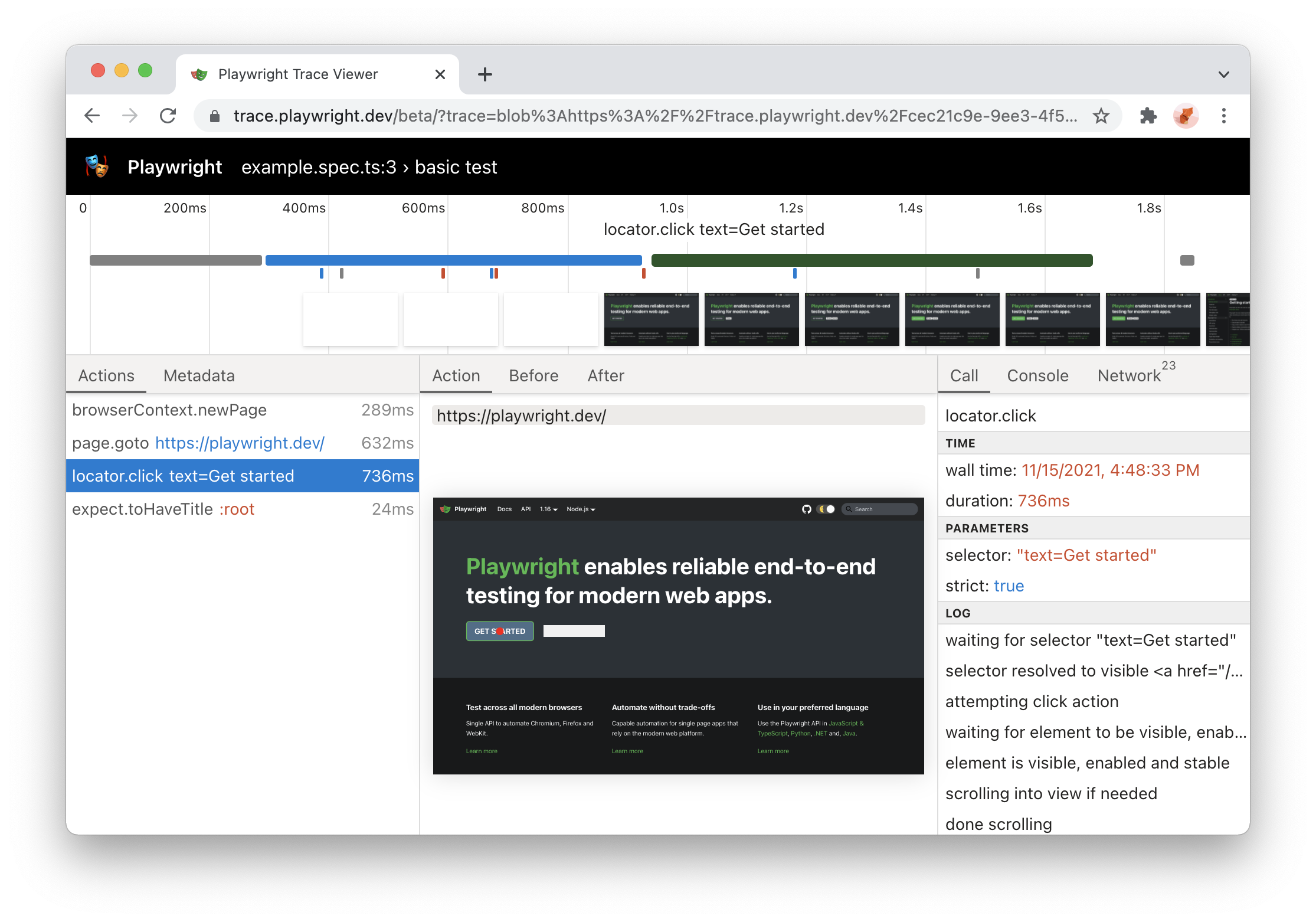
Trace Viewer Update
copilotbrowser Trace Viewer is now available online at https://trace.copilotbrowser.dev! Just drag-and-drop your trace.zip file to inspect its contents.
NOTE: trace files are not uploaded anywhere; trace.copilotbrowser.dev is a progressive web application that processes traces locally.
- copilotbrowser Test traces now include sources by default (these could be turned off with tracing option)
- Trace Viewer now shows test name
- New trace metadata tab with browser details
- Snapshots now have URL bar
HTML Report Update
- HTML report now supports dynamic filtering
- Report is now a single static HTML file that could be sent by e-mail or as a slack attachment.

Ubuntu ARM64 support + more
- copilotbrowser now supports Ubuntu 20.04 ARM64. You can now run copilotbrowser tests inside Docker on Apple M1 and on Raspberry Pi.
- You can now use copilotbrowser to install stable version of Edge on Linux:
npx copilotbrowser install msedge
New APIs
Version 1.16
🎭 copilotbrowser Library
locator.wait_for
Wait for a locator to resolve to a single element with a given state.
Defaults to the state: 'visible'.
Comes especially handy when working with lists:
order_sent = page.locator("#order-sent")
order_sent.wait_for()
Read more about Locator.waitFor().
Docker support for Arm64
copilotbrowser Docker image is now published for Arm64 so it can be used on Apple Silicon.
Read more about Docker integration.
🎭 copilotbrowser Trace Viewer
- run trace viewer with
npx copilotbrowser show-traceand drop trace files to the trace viewer PWA - better visual attribution of action targets
Read more about Trace Viewer.
Browser Versions
- Chromium 97.0.4666.0
- Mozilla Firefox 93.0
- WebKit 15.4
This version of copilotbrowser was also tested against the following stable channels:
- Google Chrome 94
- Microsoft Edge 94
Version 1.15
🖱️ Mouse Wheel
By using Mouse.wheel() you are now able to scroll vertically or horizontally.
📜 New Headers API
Previously it was not possible to get multiple header values of a response. This is now possible and additional helper functions are available:
- Request.allHeaders()
- Request.headersArray()
- Request.headerValue()
- Response.allHeaders()
- Response.headersArray()
- Response.headerValue()
- Response.headerValues()
🌈 Forced-Colors emulation
Its now possible to emulate the forced-colors CSS media feature by passing it in the Browser.newContext() or calling Page.emulateMedia().
New APIs
- Page.route() accepts new
timesoption to specify how many times this route should be matched. - Page.setChecked() and Locator.setChecked() were introduced to set the checked state of a checkbox.
- Request.sizes() Returns resource size information for given http request.
- Tracing.startChunk() - Start a new trace chunk.
- Tracing.stopChunk() - Stops a new trace chunk.
Browser Versions
- Chromium 96.0.4641.0
- Mozilla Firefox 92.0
- WebKit 15.0
Version 1.14
⚡️ New "strict" mode
Selector ambiguity is a common problem in automation testing. "strict" mode ensures that your selector points to a single element and throws otherwise.
Pass strict=true into your action calls to opt in.
# This will throw if you have more than one button!
page.click("button", strict=True)
📍 New Locators API
Locator represents a view to the element(s) on the page. It captures the logic sufficient to retrieve the element at any given moment.
The difference between the Locator and ElementHandle is that the latter points to a particular element, while Locator captures the logic of how to retrieve that element.
Also, locators are "strict" by default!
locator = page.locator("button")
locator.click()
Learn more in the documentation.
🧩 Experimental React and Vue selector engines
React and Vue selectors allow selecting elements by its component name and/or property values. The syntax is very similar to attribute selectors and supports all attribute selector operators.
page.locator("_react=SubmitButton[enabled=true]").click()
page.locator("_vue=submit-button[enabled=true]").click()
Learn more in the react selectors documentation and the vue selectors documentation.
✨ New nth and visible selector engines
nthselector engine is equivalent to the:nth-matchpseudo class, but could be combined with other selector engines.visibleselector engine is equivalent to the:visiblepseudo class, but could be combined with other selector engines.
# select the first button among all buttons
button.click("button >> nth=0")
# or if you are using locators, you can use first, nth() and last
page.locator("button").first.click()

# click a visible button
button.click("button >> visible=true")
Browser Versions
- Chromium 94.0.4595.0
- Mozilla Firefox 91.0
- WebKit 15.0
Version 1.13
copilotbrowser
- 🖖 Programmatic drag-and-drop support via the Page.dragAndDrop() API.
- 🔎 Enhanced HAR with body sizes for requests and responses. Use via
recordHaroption in Browser.newContext().
Tools
- copilotbrowser Trace Viewer now shows parameters, returned values and
console.log()calls.
New and Overhauled Guides
Browser Versions
- Chromium 93.0.4576.0
- Mozilla Firefox 90.0
- WebKit 14.2
New copilotbrowser APIs
- new
baseURLoption in Browser.newContext() and Browser.newPage() - Response.securityDetails() and Response.serverAddr()
- Page.dragAndDrop() and Frame.dragAndDrop()
- Download.cancel()
- Page.inputValue(), Frame.inputValue() and ElementHandle.inputValue()
- new
forceoption in Page.fill(), Frame.fill(), and ElementHandle.fill() - new
forceoption in Page.selectOption(), Frame.selectOption(), and ElementHandle.selectOption()
Version 1.12
🧟♂️ Introducing copilotbrowser Trace Viewer
copilotbrowser Trace Viewer is a new GUI tool that helps exploring recorded copilotbrowser traces after the script ran. copilotbrowser traces let you examine:
- page DOM before and after each copilotbrowser action
- page rendering before and after each copilotbrowser action
- browser network during script execution
Traces are recorded using the new BrowserContext.tracing API:
browser = chromium.launch()
context = browser.new_context()

# Start tracing before creating / navigating a page.
context.tracing.start(screenshots=True, snapshots=True)

page.goto("https://copilotbrowser.dev")

# Stop tracing and export it into a zip archive.
context.tracing.stop(path = "trace.zip")
Traces are examined later with the copilotbrowser CLI:
copilotbrowser show-trace trace.zip
That will open the following GUI:

👉 Read more in trace viewer documentation.
Browser Versions
- Chromium 93.0.4530.0
- Mozilla Firefox 89.0
- WebKit 14.2
This version of copilotbrowser was also tested against the following stable channels:
- Google Chrome 91
- Microsoft Edge 91
New APIs
reducedMotionoption in Page.emulateMedia(), BrowserType.launchPersistentContext(), Browser.newContext() and Browser.newPage()- BrowserContext.event('request')
- BrowserContext.event('requestFailed')
- BrowserContext.event('requestFinished')
- BrowserContext.event('response')
tracesDiroption in BrowserType.launch() and BrowserType.launchPersistentContext()- new BrowserContext.tracing API namespace
- new Download.page() method
Version 1.11
🎥 New video: copilotbrowser: A New Test Automation Framework for the Modern Web (slides)
- We talked about copilotbrowser
- Showed engineering work behind the scenes
- Did live demos with new features ✨
- Special thanks to applitools for hosting the event and inviting us!
Browser Versions
- Chromium 92.0.4498.0
- Mozilla Firefox 89.0b6
- WebKit 14.2
New APIs
- support for async predicates across the API in methods such as Page.waitForRequest() and others
- new emulation devices: Galaxy S8, Galaxy S9+, Galaxy Tab S4, Pixel 3, Pixel 4
- new methods:
- Page.waitForURL() to await navigations to URL
- Video.delete() and Video.saveAs() to manage screen recording
- new options:
screenoption in the Browser.newContext() method to emulatewindow.screendimensionspositionoption in Page.check() and Page.uncheck() methodstrialoption to dry-run actions in Page.check(), Page.uncheck(), Page.click(), Page.dblclick(), Page.hover() and Page.tap()
Version 1.10
- copilotbrowser for Java v1.10 is now stable!
- Run copilotbrowser against Google Chrome and Microsoft Edge stable channels with the new channels API.
- Chromium screenshots are fast on Mac & Windows.
Bundled Browser Versions
- Chromium 90.0.4430.0
- Mozilla Firefox 87.0b10
- WebKit 14.2
This version of copilotbrowser was also tested against the following stable channels:
- Google Chrome 89
- Microsoft Edge 89
New APIs
- BrowserType.launch() now accepts the new
'channel'option. Read more in our documentation.
Version 1.9
-
copilotbrowser Inspector is a new GUI tool to author and debug your tests.
- Line-by-line debugging of your copilotbrowser scripts, with play, pause and step-through.
- Author new scripts by recording user actions.
- Generate element selectors for your script by hovering over elements.
- Set the
PWDEBUG=1environment variable to launch the Inspector
-
Pause script execution with Page.pause() in headed mode. Pausing the page launches copilotbrowser Inspector for debugging.
-
New has-text pseudo-class for CSS selectors.
:has-text("example")matches any element containing"example"somewhere inside, possibly in a child or a descendant element. See more examples. -
Page dialogs are now auto-dismissed during execution, unless a listener for
dialogevent is configured. Learn more about this. -
copilotbrowser for Python is now stable with an idiomatic snake case API and pre-built Docker image to run tests in CI/CD.
Browser Versions
- Chromium 90.0.4421.0
- Mozilla Firefox 86.0b10
- WebKit 14.1
New APIs
- Page.pause().
Version 1.8
- Selecting elements based on layout with
:left-of(),:right-of(),:above()and:below(). - copilotbrowser now includes command line interface, former copilotbrowser-cli.
copilotbrowser --help - Page.selectOption() now waits for the options to be present.
- New methods to assert element state like Page.isEditable().
New APIs
- ElementHandle.isChecked().
- ElementHandle.isDisabled().
- ElementHandle.isEditable().
- ElementHandle.isEnabled().
- ElementHandle.isHidden().
- ElementHandle.isVisible().
- Page.isChecked().
- Page.isDisabled().
- Page.isEditable().
- Page.isEnabled().
- Page.isHidden().
- Page.isVisible().
- New option
'editable'in ElementHandle.waitForElementState().
Browser Versions
- Chromium 90.0.4392.0
- Mozilla Firefox 85.0b5
- WebKit 14.1
Version 1.7
- New Java SDK: copilotbrowser for Java is now on par with JavaScript, Python and .NET bindings.
- Browser storage API: New convenience APIs to save and load browser storage state (cookies, local storage) to simplify automation scenarios with authentication.
- New CSS selectors: We heard your feedback for more flexible selectors and have revamped the selectors implementation. copilotbrowser 1.7 introduces new CSS extensions and there's more coming soon.
- New website: The docs website at copilotbrowser Github.io has been updated and is now built with Docusaurus.
- Support for Apple Silicon: copilotbrowser browser binaries for WebKit and Chromium are now built for Apple Silicon.
New APIs
- BrowserContext.storageState() to get current state for later reuse.
storageStateoption in Browser.newContext() and Browser.newPage() to setup browser context state.
Browser Versions
- Chromium 89.0.4344.0
- Mozilla Firefox 84.0b9
- WebKit 14.1